Step 01
Enable magnetic primary-storyline mode
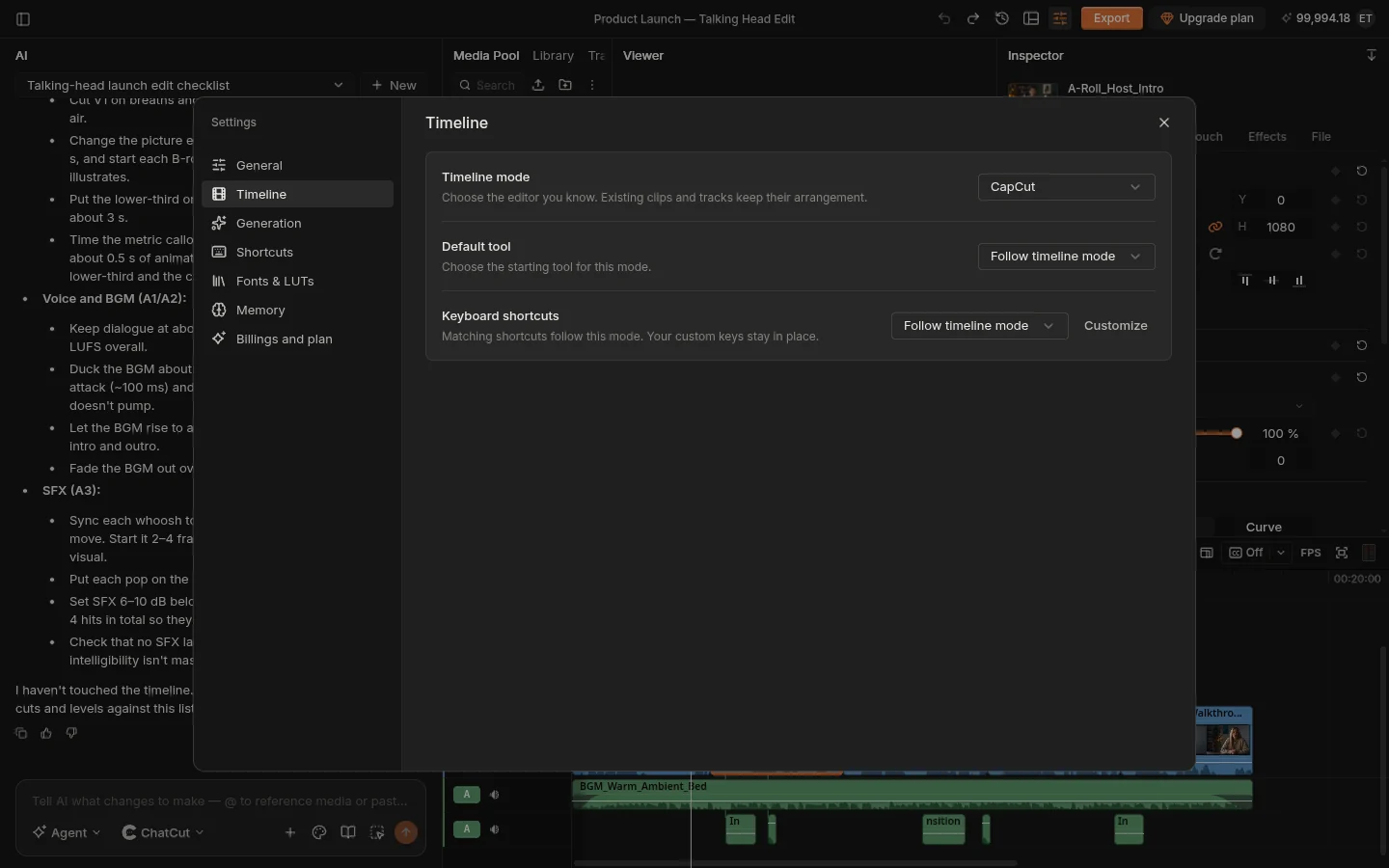
Open Settings → Timeline and select CapCut timeline mode to turn on magnetic primary-storyline editing with gapless ripple and snap.
Enable magnetic primary-storyline editing and Final Cut keyboard shortcuts on Mac and Windows, now with built-in AI.






Trusted by 400,000+ creators
Turn on magnetic primary-storyline editing and pick the Final Cut Pro keyboard preset in Settings.
Open Settings → Timeline and select CapCut timeline mode to turn on magnetic primary-storyline editing with gapless ripple and snap.
Open Settings → Shortcuts and choose Final Cut Pro from the Preset menu to keep your tool, split, nudge, and zoom bindings.
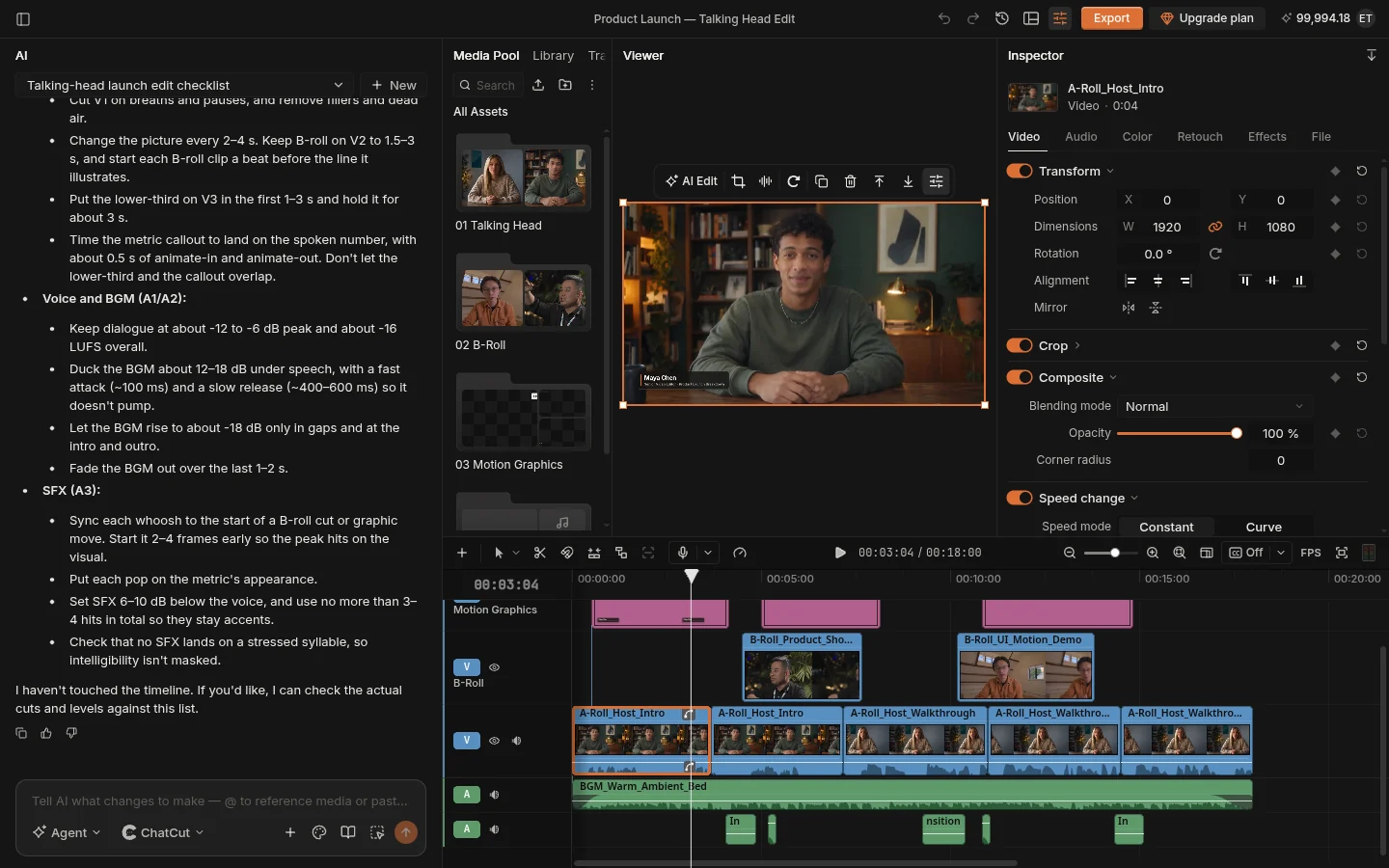
Drag clips along the primary storyline and adjacent cuts snap cleanly without leaving gaps, on both Mac and Windows.
Recorded live in ChatCut Desktop dark mode with magnetic primary-storyline editing and the Final Cut Pro shortcut preset.
Copy any prompt into ChatCut AI chat on Desktop to remap shortcuts, tweak the theme, or rearrange panels.
Load the Final Cut Pro preset, then map Toggle Inspector to Cmd+4 and Blade All to Shift+B.
AI writes directly to your local shortcuts file so your Mac or Windows muscle memory transfers immediately.
Give dark mode a deeper matte charcoal canvas and muted slate audio tracks.
Switch built-in skins or ask AI to customize your local appearance CSS with instant live reload.
Keep the AI sidebar narrow and pin the Video Inspector on the right beside the viewer.
Get the clean, focused editing feel you expect from Final Cut while keeping AI editing one prompt away.
ChatCut Desktop stores skins, custom CSS appearance, keyboard shortcuts, and workspace layouts as live-reloaded local settings files that AI edits on request.
Compare Mac and Windows editors, pricing, and FCPXML transfer limits before switching.
| App | Best for | Free version | Paid from (US) |
|---|---|---|---|
| Let an agent make the cut | |||
| ChatCut | A captioned first cut from new interview footage | Editor, captions, transcription, local export | Starter: 100 credits, $25/mo or $252/yr |
| Keep the edit simple | |||
| iMovie | Free personal videos on Apple devices | Free | $0 |
| OpenShot | Layering photos, video, and music by hand | Full editor without watermarks | $0 |
| Free desktop control | |||
| Shotcut | Free editing with broad format support | Free and open source | $0 |
| Kdenlive | Free editing with proxies and nested sequences | Free and open source | $0 |
| Professional finishing | |||
| DaVinci Resolve | Editing, grading and audio in one finishing app | Most 8-bit formats, up to UHD at 60 fps | Studio $236 on sale (regularly $295) |
We make ChatCut. On November 19, 2026, we checked US prices, platform support, and project-transfer instructions against official documentation. We did not test these editors with the same footage. Final Cut Pro for Mac is $299.99 as a one-time purchase. Apple Creator Studio is $12.99/month or $129/year and includes Final Cut Pro on Mac and iPad. US prices checked November 19, 2026. Apple Final Cut Pro pricing
A new platform or a different editing process can justify switching. A headline about subscriptions is not enough: Apple still offers the Mac purchase.
Apple offers Final Cut Pro on Mac and iPad. Resolve, Shotcut, Kdenlive and ChatCut give PC users a path without buying a Mac solely for editing.
Final Cut Pro platformsFor a short personal movie on a Mac, iMovie may cover the job. Resolve Free provides a deeper finishing workflow across desktop platforms.
Free iMovie listingChatCut’s agent workflow can create an editable first cut from source footage. Use it for new projects; do not assume it imports existing Final Cut libraries.
ChatCut editable first-cut workflowFinal Cut uses FCPXML. The word XML alone does not make another editor compatible. Confirm the dialect, media links and unsupported effects before moving a client job.
Apple FCPXML documentationChoose by what you deliver: a home movie, a captioned rough cut, or a color-graded master. The prices below cover US plans and desktop editions.
Let an agent make the cutFor footage you want to edit through a conversation.
Best for a captioned first cut from new interview footage
Already in an AI agent? Send this to  Codex
 Claude Code
Read chatcut.io/desktop to install ChatCut, then turn my product footage into a 45-second launch video with captions and an animated title, using a new project.
Keep the edit simpleFor short projects you want to assemble yourself.
Best for free personal videos on Apple devices
Best for layering photos, video, and music by hand
Free desktop controlFor hands-on timelines and open-source workflows.
Best for free editing with broad format support
Best for free editing with proxies and nested sequences
Professional finishingFor grading, complex timelines and final delivery.
Best for editing, grading and audio in one finishing app
Check the actual bill and the project format. A lower initial price does not guarantee a cheaper or compatible workflow.
| Check | Final Cut Pro / Apple | ChatCut |
|---|---|---|
| Twelve months, billed monthlyApple monthly price | Creator Studio: 12 × $12.99 = $155.88 before tax. | Starter (100 credits/month): 12 × $25 = $300 before tax. |
| Annual payment or Mac purchaseChatCut pricing; Apple price linked above | Creator Studio: $129/year. Mac app: $299.99 one-time. | Starter (100 credits/month): $252/year. Core manual editor has a Free plan. |
| Editable timeline dialectApple XML file format | FCPXML; version 1.10 or later exports a .fcpxmld bundle. | FCP7 XMEML for Premiere and Resolve. ChatCut does not export FCPXML. |
| What can travel separatelyApple caption export | Rendered video and caption sidecars; keep original media and library. | Import original media into the Media Pool. In ChatCut Desktop, right-click a subtitle file and choose Import as Captions. |
Totals use 12 payments at US monthly rates before tax, trials, or extra credits. Creator Studio includes several Apple apps. ChatCut Starter includes a monthly credit allowance for the agent and AI tools.
Preserve the library and source media. Export a reference movie in an appropriate format; Apple documents ProRes, H.264 and HEVC output. A rendered file preserves the look but flattens the edit.
Final Cut export formatsSelect the project and choose File → Export XML. Check which FCPXML version the destination accepts before exporting.
Export XML from Final CutUse File → Export Closed Captions, select language roles and export SRT when applicable. Check timeline-relative versus absolute timecodes and whether to include formatting.
Apple caption sidecar workflowIn ChatCut Desktop, open Media Pool → Import and select the original clips. Rebuild one scene against your reference movie before moving the rest.
ChatCut media importQuestions
Resolve is the strongest starting point here for a full finishing workflow on Mac, Windows or Linux. Kdenlive and Shotcut are free open-source choices. If you only need a simple Mac movie, iMovie is already free.
Apple lists the Mac app at $299.99 one-time. Creator Studio costs $12.99/month or $129/year and includes the Mac and iPad apps. Checked November 19, 2026; education and trial offers have separate eligibility.
Apple current pricingStay if its Magnetic Timeline, multicam tools and your existing libraries suit your Mac workflow. Buying another editor does not recover time spent rebuilding projects or replacing effects. The standalone Mac purchase is still available.
Not as a documented native project transfer. Keep the library, original media, reference export and caption files. Rebuild from source media in ChatCut. ChatCut’s XML export targets Premiere and Resolve, not Final Cut Pro.
ChatCut XML compatibilityApple offers Final Cut Pro for Mac and iPad. For Windows, try Resolve for grading, Kdenlive for multicam editing, or OpenShot for a simple cut. Check the receiving editor’s import options before moving an active project.
For a year at US monthly rates, ChatCut Starter costs $300 and Apple Creator Studio costs $155.88. ChatCut also has a free manual editor. An existing Final Cut Pro for Mac purchase has no monthly fee.
Yes. ChatCut Desktop offers magnetic primary-storyline editing (via CapCut timeline mode in Settings → Timeline) and a built-in Final Cut Pro keyboard preset (A Select, T Trim, B Blade, Mod+B Split, V Enable/Disable, N Snapping) on both macOS and Windows. FCPXML import and export are not supported, so start new cuts from your source footage.
No. Final Cut uses FCPXML. ChatCut exports FCP7 XMEML for Premiere and Resolve, and that handoff can skip captions, effects, transitions, and nested timelines. Test a short sequence before moving the full project.
ChatCut XML limitationsOpen ChatCut in your browser and start free. Prefer an app? It runs on Mac and Windows too.